



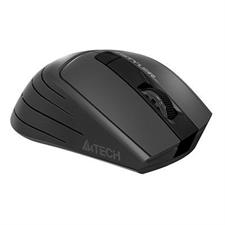
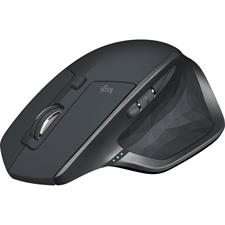
A4Tech G7-810S Air2 2.4GHz Silent Wireless Mouse, 2000 DPI
₨ 2,600
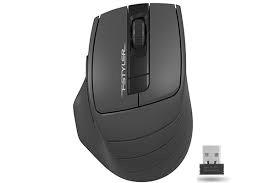
- 2.4GHz wireless mouse with quiet clicks and a right-handed design.
- Desk mode for everyday tracking and Air mode for media playback and volume control.
- Optical sensor with four DPI settings: 1000, 1200, 1600 and 2000 DPI.
- Seven buttons, including forward and back thumb buttons and a dedicated screenshot button for Windows 10 and 11.
- Includes a USB-A nano receiver, USB-C adapter and one AA battery.
A4Tech G7-810S Air2 Silent Wireless Mouse
The A4Tech G7-810S Air2 is a right-handed wireless mouse for everyday office and home use. Its quiet clicks help reduce distractions at shared desks, and the side buttons let you move back and forward while browsing. Choose from four DPI settings to adjust cursor speed for documents, spreadsheets and web browsing.
Desk Tracking and Air Media Controls
Use the mouse on a desk for normal pointer control. To enable Air mode, lift the mouse and hold the left and right buttons together for five seconds. In this mode, the buttons and scroll wheel control functions such as play, pause, track selection and volume. Air mode works as a media remote, and available commands depend on the application.
Windows Screenshot Shortcut and PC Anti-Sleep Mode
The dedicated capture button opens Windows screenshot options, including rectangular, free-form, window and full-screen capture. This shortcut requires Windows 10 or 11. The optional Anti-Sleep mode simulates pointer movement to help keep the PC awake during tasks such as long downloads.
USB-A Receiver with a USB-C Adapter
Plug the included nano receiver into a USB-A port or use the supplied adapter to connect it to a USB-C port. The mouse uses one AA battery and has a built-in slot for storing the receiver when you travel.
Technical Specifications
| Brand | A4Tech |
|---|---|
| Model | G7-810S Air2 |
| Colour | Black |
| Connection | 2.4GHz wireless via USB-A nano receiver |
| Wireless range | 10–15 m, as rated by A4Tech |
| Sensor | Optical |
| DPI settings | 1000, 1200, 1600 and 2000 DPI |
| Polling rate | 125 Hz |
| Buttons | 7 |
| Click type | Silent clicks |
| Grip design | Right-handed |
| Power | 1 AA alkaline battery |
| Dimensions | 111 × 77 × 37 mm |
| Weight | 95 g with battery |
| Operating systems | Windows 10 and 11 |
| Box contents | Mouse, USB-A nano receiver, USB-C adapter, one AA battery and user manual |
Frequently Asked Questions
What is the A4Tech G7-810S Air2 price in Pakistan?
Contact Tescom Engineering for the current price in PKR, stock availability and applicable warranty terms.
Does the A4Tech G7-810S Air2 support Bluetooth?
No. It connects wirelessly through the included 2.4GHz USB nano receiver.
How do I activate Air mode?
Lift the mouse off the desk and hold the left and right buttons together for five seconds. No software installation is needed to activate Air mode.
Can I use the mouse with a USB-C laptop?
Yes. Use the included USB-C adapter to connect the USB-A nano receiver to a USB-C port.
Is the A4Tech G7-810S Air2 rechargeable?
It runs on one replaceable AA battery. The included USB-C adapter connects the receiver to your computer.
Which DPI settings can I choose?
Use the DPI button to cycle through 1000, 1200, 1600 and 2000 DPI.
Reviews
There are no reviews yet.