


Meetion GW13 Tri-Mode Wireless Office Mouse Black
₨ 2,980
- Tri-Mode Connectivity with 2.4GHz Wireless, Bluetooth and USB-C Wired Modes
- Six Adjustable DPI Levels from 800 to 12800 DPI
- Six Programmable Buttons with an Adjustable 125–1000Hz Polling Rate
- Rechargeable 500mAh Battery with Up to 40 Hours of Working Time
Meetion GW13 Tri-Mode Wireless Office Mouse Black
Product Features
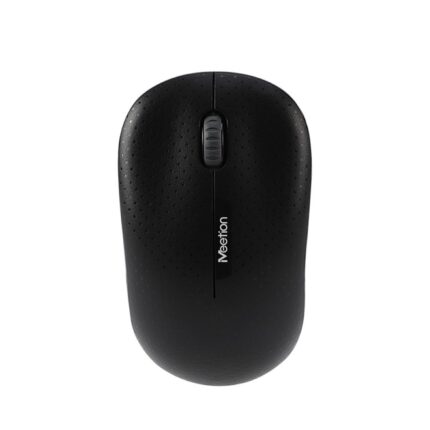
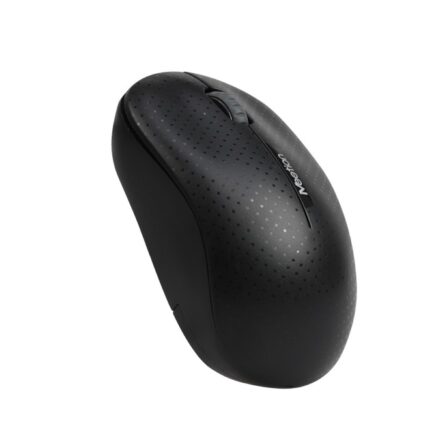
The Meetion GW13 is a lightweight tri-mode mouse designed for office productivity, creative work and gaming. Its ergonomic palm-fit shape, high-resolution optical tracking and flexible connectivity make it suitable for users who require one mouse for multiple devices and applications.
Tri-mode connectivity allows the GW13 to operate through 2.4GHz wireless, Bluetooth or a wired USB Type-C connection. Users can connect it to compatible desktop computers, laptops, tablets and other supported devices, with a wireless operating distance of up to 10 metres.
The optical sensor offers six selectable resolution levels: 800, 1600, 2400, 3200, 6400 and 12800 DPI. These options allow users to choose controlled cursor movement for office applications or higher sensitivity for large displays, creative software and fast-paced gaming.
An adjustable polling rate ranging from 125Hz to 1000Hz provides responsive cursor tracking. The maximum 1000Hz setting is designed for applications where quick and accurate input is important.
The Meetion GW13 includes six buttons and supports button customization through compatible Meetion driver software. Users can configure supported controls according to their office workflow, creative applications or gaming requirements.
Quiet button operation helps reduce distracting clicking sounds during office work, studying, meetings and late-night use. The switches are rated for approximately eight million clicks, providing durability for regular use.
Its ergonomic shape is designed to fit naturally in the palm, while the lightweight 65-gram construction supports smooth movement and comfortable handling. The black finish provides a clean and professional appearance.
A built-in 500mAh rechargeable battery provides up to approximately 40 hours of working time under applicable conditions. Charging takes approximately two hours through the USB Type-C interface.
The Meetion GW13 supports Windows and macOS. It can be used wirelessly for a clean desktop setup or connected through its Type-C cable when wired operation or charging is required.
Technical Specifications
| Brand | Meetion |
| Model | GW13 |
| Product Type | Tri-Mode Wireless Performance Mouse |
| Color | Black |
| Tracking Technology | Optical |
| Connection Modes | 2.4GHz Wireless, Bluetooth and USB-C Wired |
| Wireless Operating Range | Up to 10 Metres |
| Number of Buttons | 6 Buttons |
| DPI Levels | 800 / 1600 / 2400 / 3200 / 6400 / 12800 DPI |
| Maximum Resolution | 12800 DPI |
| Polling Rate | 125Hz–1000Hz |
| Maximum Polling Rate | 1000Hz |
| Button Customization | Supported through Compatible Driver Software |
| Button Design | Quiet Click |
| Switch Life | Approximately 8 Million Clicks |
| Battery Type | Built-In Rechargeable Battery |
| Battery Capacity | 500mAh |
| Working Time | Up to Approximately 40 Hours |
| Charging Time | Approximately 2 Hours |
| Charging Interface | USB Type-C |
| Dimensions | 120 × 65 × 40 mm |
| Weight | 65 ± 2 g |
| Supported Systems | Windows and macOS |
| Operating Temperature | 0°C to 40°C |
| Storage Temperature | -20°C to 60°C |
Frequently Asked Questions (FAQs)
What connection modes does the Meetion GW13 support?
The GW13 supports 2.4GHz wireless, Bluetooth and USB Type-C wired connectivity.
Can the Meetion GW13 be used while charging?
Yes. Its USB-C wired mode allows the mouse to remain connected while receiving power through the cable.
What is the maximum DPI of the Meetion GW13?
The mouse supports a maximum resolution of 12800 DPI, with six selectable levels starting from 800 DPI.
Is the Meetion GW13 suitable for office use?
Yes. Its ergonomic design, quiet buttons, rechargeable battery and flexible connectivity make it suitable for office work and general productivity.
Is the Meetion GW13 also suitable for gaming?
Yes. Its maximum 12800 DPI resolution, adjustable polling rate of up to 1000Hz and programmable buttons support gaming as well as everyday work.
How many buttons does the Meetion GW13 have?
It has six buttons that can be customized through compatible Meetion driver software.
How long does the GW13 battery last?
The built-in 500mAh battery provides up to approximately 40 hours of use. Actual battery life can vary according to the selected mode, polling rate and usage.
How long does the Meetion GW13 take to charge?
The specified charging time is approximately two hours through the USB Type-C interface.
What is the wireless range of the Meetion GW13?
The specified wireless operating distance is up to 10 metres under suitable conditions.
Does the Meetion GW13 work with Windows and macOS?
Yes. The mouse supports compatible Windows and macOS computers.
Reviews
There are no reviews yet.