
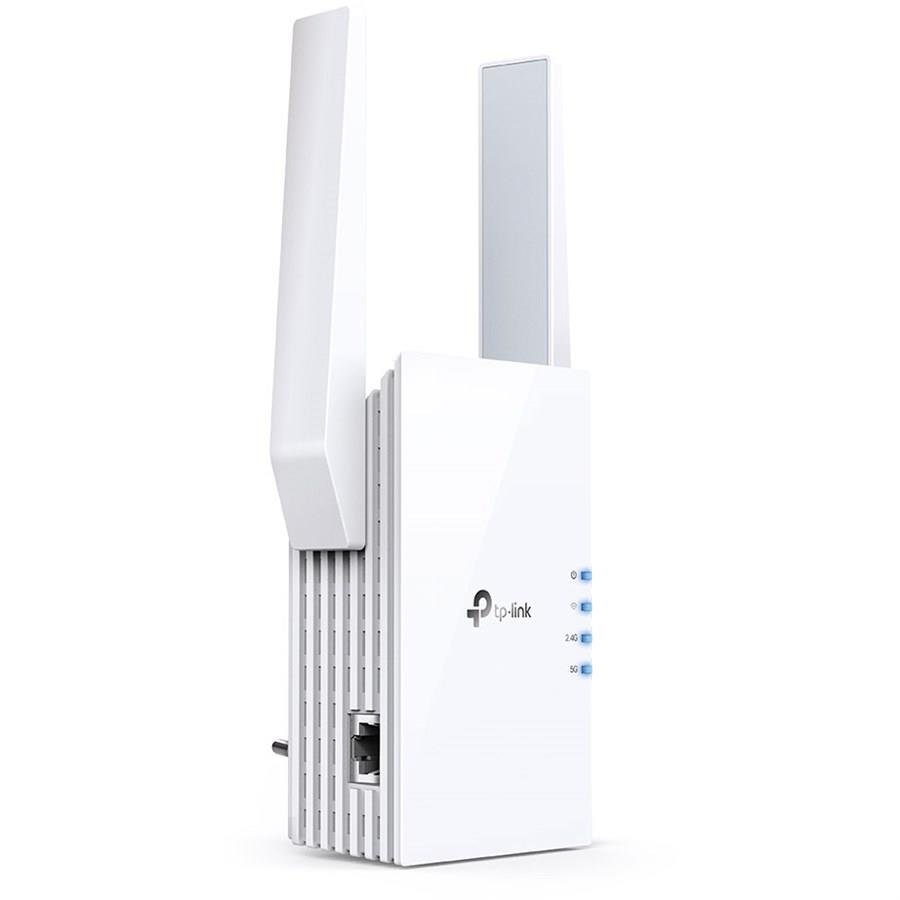

TP-Link RE505X AX1500 Wi-Fi 6 Range Extender
- AX1500 Wi-Fi 6 Range Extender for Faster Speed & Increased Network Capacity
- TP-Link OneMesh Support for Seamless Whole-Home Wi-Fi Coverage
- Gigabit Ethernet Port for High-Speed Wired Device Connectivity
- Intelligent Signal Light, Access Point Mode & TP-Link Tether App Support
TP-Link RE505X AX1500 Wi-Fi 6 Range Extender
Product Features
AX1500 Wi-Fi 6 Range Extender: The TP-Link RE505X is an AX1500 Wi-Fi range extender designed to expand the coverage of an existing wireless network. Wi-Fi 6 technology provides improved wireless speed, capacity, and efficiency for compatible devices.
Extended Wi-Fi Coverage: The RE505X connects to an existing Wi-Fi router or wireless access point and extends its wireless signal into areas where coverage may otherwise be weak or difficult to reach.
Wi-Fi 6 Technology: Built with the latest Wi-Fi 6 wireless technology, the RE505X is designed to provide faster connectivity, increased network capacity, and reduced congestion when used with compatible equipment.
TP-Link OneMesh Support: When connected to a compatible TP-Link OneMesh router, the RE505X can become part of a Mesh network for seamless whole-home wireless coverage.
Unified Mesh Experience: OneMesh allows compatible TP-Link networking devices to work together, helping users maintain wireless connectivity while moving between different areas of the home.
Gigabit Ethernet Port: The built-in Gigabit Ethernet port provides a high-speed wired connection for compatible devices such as desktop computers, Smart TVs, gaming consoles, and other Ethernet-enabled equipment.
Intelligent Signal Light: The integrated signal indicator helps determine an appropriate location for the range extender by displaying the strength of the wireless connection received from the existing router.
Access Point Mode: The RE505X can operate in Access Point Mode to transform an existing wired network connection into a wireless network.
TP-Link Tether App: Compatible network settings and management functions can be accessed through the TP-Link Tether app on supported iOS and Android mobile devices.
Broad Router Compatibility: The RE505X is designed to extend the wireless range of compatible Wi-Fi routers and wireless access points, providing flexibility when upgrading an existing home or office network.
Product Specifications
| Brand | TP-Link |
| Model | RE505X |
| Product Type | Wi-Fi Range Extender |
| Wi-Fi Class | AX1500 |
| Wi-Fi Generation | Wi-Fi 6 |
| Mesh Technology | TP-Link OneMesh |
| Ethernet Port | Gigabit Ethernet |
| Access Point Mode | Supported |
| Signal Indicator | Intelligent Signal Light |
| Mobile Management | TP-Link Tether App |
| Mobile Platform Support | iOS & Android |
| Router Compatibility | Compatible Wi-Fi Routers & Wireless Access Points |
| Recommended Application | Extending Existing Wi-Fi Coverage |
Ideal For
- Extending Home Wi-Fi Coverage
- Reducing Wi-Fi Dead Zones
- Wi-Fi 6 Network Expansion
- TP-Link OneMesh Networks
- Multi-Floor Homes
- Home & Small Office Networks
- Smart TVs & Gaming Consoles
- Desktop Computer Connectivity
- High-Speed Wired Connections
Frequently Asked Questions
What is the TP-Link RE505X?
The TP-Link RE505X is an AX1500 Wi-Fi 6 range extender designed to expand the coverage of an existing wireless network.
Does the TP-Link RE505X support Wi-Fi 6?
Yes. The RE505X supports Wi-Fi 6 technology for improved wireless speed, capacity, and network efficiency with compatible devices.
Does the RE505X support Mesh Wi-Fi?
Yes. It supports TP-Link OneMesh and can create a Mesh network when connected to a compatible TP-Link OneMesh router.
Can the RE505X work with other Wi-Fi routers?
The RE505X is designed to extend the range of compatible Wi-Fi routers and wireless access points. OneMesh functionality requires a compatible TP-Link OneMesh router.
Does the RE505X have an Ethernet port?
Yes. It features a Gigabit Ethernet port for connecting compatible wired devices such as computers, Smart TVs, and gaming consoles.
Can the RE505X work as an access point?
Yes. Access Point Mode allows the RE505X to create a wireless network from an existing wired network connection.
How can I find the best location for the RE505X?
The Intelligent Signal Light indicates wireless signal strength to help determine a suitable location between the existing router and the area requiring improved coverage.
Can the RE505X be managed from a smartphone?
Yes. Supported network settings can be accessed and managed through the TP-Link Tether app on compatible iOS and Android devices.
Reviews
There are no reviews yet.